
![What a *#%•]\<£¥*!!ing nightmare.](https://riversworld.live/wp-content/uploads/2023/07/img_0546.jpg?w=430&h=327&crop=1)
.
Time for an update on the beyond ridiculous process that my husband has undertaken to be reinstated in his government job.
If you remember correctly, this was begun in late February . Yes, it was over four months ago that his old boss approved his return to the office after only a year of (apparently unhappy) retirement.
In that time we have sent resumes, met with onboarding teams and FAA representatives, corresponded with human resource officers and filled out more forms than I thought humanly possible. Every time we think we’re done? They send more.
Mind you, this is a man who spent 22 years in the Marine Corps, 6 with defense contractors, 2 with the American Embassy in Tunisia, and 20 with the FAA. In other words, the government knows him inside and out.
And yet….
.
The position you have applied for requires a background investigation. You must complete the following tasks within 15 calendar days of receiving this email:
.
We just had to jump through hoops for a background check. For the man who’s held Top Secret clearance more than half of his life.
The forms were unbelievable. It took over 2 1/2 hours to fill them out online. Don’t remember your supervisor’s telephone number from 1979? Well buddy, you’d better find it… the gov’t doesn’t like blank spaces.
They wanted a complete history of our parents, all four of whom are dead. They even wanted the exact date my grandparents stepped foot on American soil and became naturalized citizens. Uh… check the Ellis Island records because I have no friggin’ clue.
None of this was required when he started working there in 2001. Back then it was a resume, a handshake, see you Monday morning.
.
Obtain two sets of fingerprints. If you are located near an FAA facility that provides fingerprinting services.
- You can make an appointment to have your fingerprints taken at no charge. You can also get fingerprinted at a local law enforcement agency. If going to a local law enforcement agency, bring two copies of the attached SF-87 (fingerprint card) to have your prints taken on, or you can be printed on a law enforcement agency provided card (two cards). We accept “ink prints” and “digital/electronic” prints. If your fingerprints are taken digitally, please ensure the agency can print them on card stock paper. Ensure all required identifying information is completed on the card and the finger-printing official signs both cards.
- Print, complete, and sign the Disclosure and Authorization Pertaining to Consumer Reports, DOT Form 1631 (attached).
- MAIL (FedEx/UPS/USPS) the following original forms to the Security POC listed below:
· DOT Form 1631
· Two fingerprints cards SF87s
.
Oh, he really loved that part. Walking into the police station to be fingerprinted like a felon. Good times.
When that was done, sent and approved?
More forms. With oh so helpful instructions like these.
.
As part of the hiring process, you will be completing forms online in the **** This email contains your personal web link and must be used to successfully complete the log-in process and begin completing your forms. Before filling out your forms that may contain ‘Personally Identifiable Information’ (PII), ensure you have installed the latest patches for the Internet browser you are using (i.e., Microsoft Edge, Google Chrome, etc.).
To access ****, click on the **** web link below to take you directly to the **** log in screen (do not copy/paste). Click the “Sign in with *****” button and follow the instructions with **** to authenticate your identity. It is important to note, that this email address must be used to register in ***** to access the *****. If the registered emails do not match, you will not be able to access the *****. If you need to use a different email address, please notify your Human Resources Contact included at the bottom of this email.
After a successful logon to *****, you will be redirected to the Rules of Behavior and Security Caution screen, and then onto the Common Information screen. Your first step will be to verify and update (as applicable) any information previously collected from you during the selection process. Be sure to review this information carefully, as it is used to pre-populate forms and payroll data. You will not be allowed to continue until you have completed all of the required fields.
Next you will be taken to the Forms List screen, which contains employment forms you are required to complete. Your prompt attention to complete and submit these time-sensitive forms for Human Resources (HR) approval is imperative. Please follow these steps to assist you in completing forms:
To open a form, click the “Open Form” button in the Tools column. As you are completing a form you may save it and return later to finish filling it out. You may also view your form via a “Completed PDF” at any time during this process. Once you have reviewed and completed the form (including any required electronic certifications and/or signatures), click the “Submit for Approval” button (located on both the top and bottom of the screen). You will then be presented with your Completed PDF as a final review prior to form submission. Once you have confirmed the forms submission, HR will be notified.
After a form has been submitted, an option to “Retract” will appear in the Forms List should you determine you need to pull the form submission back to make a form adjustment. NOTE: You may not retract a form that has been approved by HR.
Unless otherwise specified, please submit forms prior to your first day of employment. An HR Representative will review the form and either approve or reject the form. If the form is approved, there is no further action required by you. If a form is rejected it will show as “Rejected” in the form Status column. We recommend you frequently log into the system to check the status of your forms.
If you need assistance signing into the system or completing the online forms, please contact the Human Resources Specialist listed below at the number provided. Welcome on board!!
.
Welcome aboard my *ss, we still weren’t done.
.
I have sent you an ***** e-mail. Please go into the System and complete, electronically sign and submit the in-processing forms.
The Onboarding Team will give instructions regarding these forms: SF-61 Appointment Affidavit OF-306 Declaration For Federal Employment – Appointee Form
I-9 Employment Eligibility Verification Form SF-181 Race and Ethnicity SF-256 Handicap ID
.
I swear… somewhere in a dark depressing cubicle, buried below ground in a secret government office building, a civil service computer programmer is getting his rocks off on the superfluous and redundant paperwork generated in the hiring process.
He gets paid per form, I just know it.
.

.
Yesterday? Three… count them, three beneficiary forms that had to be filled out, printed, wet signed, witnessed by two people, scanned and sent back.
And after we did that? More forms.
I swear the only thing they don’t know at this point is how often we have sex… but now that I mention it, we may have answered that as well.
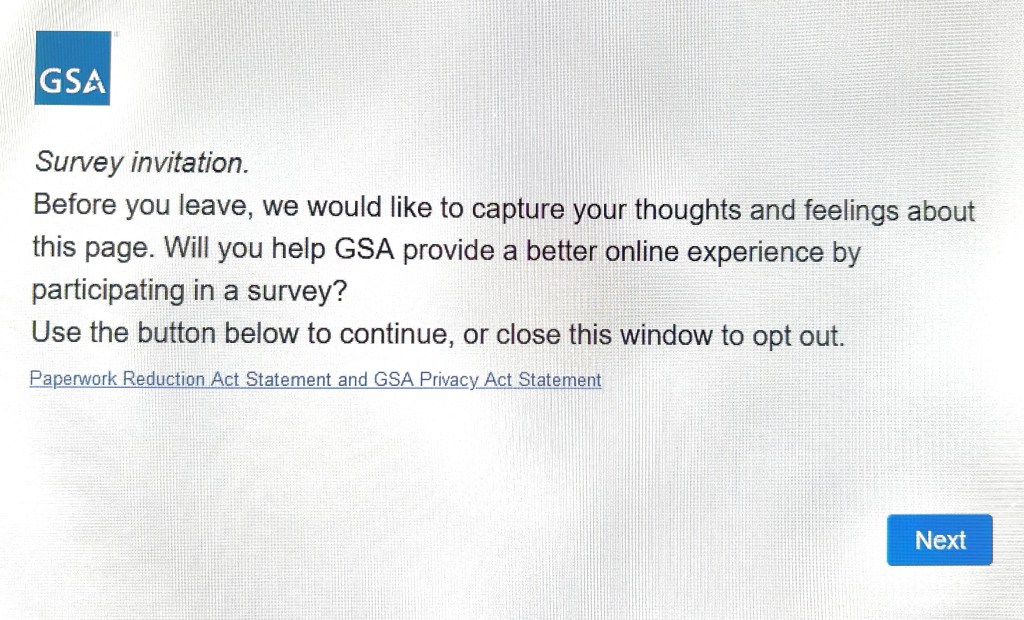
When (hopefully) the last form was completed and sent? We received this…
.
.
.
I asked the husband to let me fill out this survey. He refused.
I begged the husband to let me fill out this survey. He refused again.
I seriously wanted to fill out this survey.
In all honestly, I have never in my entire life wanted to fill out a survey so badly.
But no.
I was forbidden.
😉
.
































































 River's world.....